สำหรับท่านที่ทำ Pivot Table ใน Excel 2013 แล้วเกิดปัญหาเมื่อทำการ Refresh Data แล้วข้อมูลไม่มีการเปลี่ยนแปลง
วิธีง่าย ๆ คือการตรวจสอบการตั้งค่าเริ่มต้น Trust Center ของโปรแกรม Microsoft Excel 2013 ก่อนว่าค่าเหล่านั้นมีการเปลี่ยนแปลงไปหรือไม่ มี 3 ค่าหลัก ๆ ที่ต้องตรวจสอบดังนี้
ตรวจสอบการตั้งค่า Trust Center
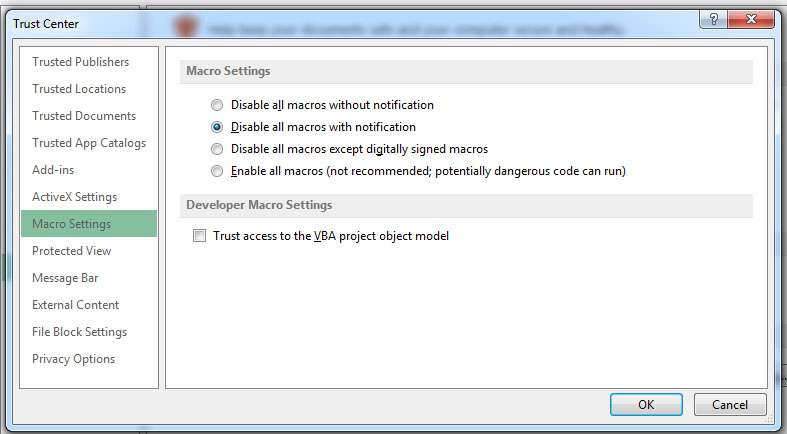
- Macro Settings
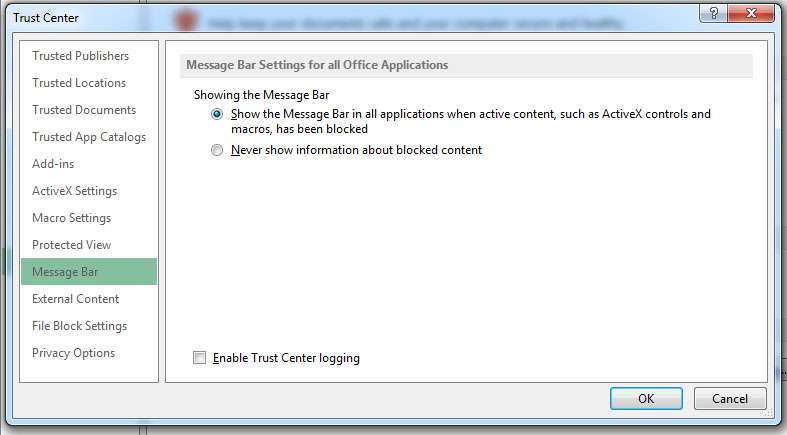
- Message Bar
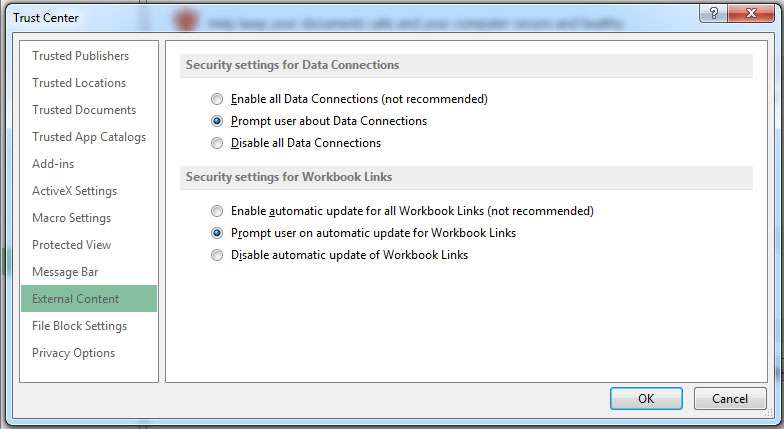
- External Content
วิธีเข้าไปตั้งค่า Trust Center
เลือกเมนู FILE > Options > Trust Center > Trust Center Settings…
ค่าเริ่มต้นของ Macro Settings
- เลือก Disable all macros with notification
ค่าเริ่มต้นของ Message Bar
Message Bar Settings for all Office Applications
- เลือก Show the Message Bar in all application when active ceontent, such as ActiveX controls and macros, has been blocked
ค่าเริ่มต้นของ External Content
Security settings for Data Connections
- เลือก Prompt user about Data Connectins
Security settings for Workbook Links
- เลือก Prompt user on automatic update for Workbook Links